Google Business Profile verification: how to pass it the first time
Until your profile is verified, it usually won't show up for anything but your exact name, and you can't manage it properly. Most new profiles are now asked for a video. Here's how each method works, what Google requires in a verification video and how to fix a failed attempt.

By Nouman Sabir, AI search & SEO specialist
Updated · 5 min read

The short answer
- Google offers the verification methods it chooses for your business: often a video recording, sometimes a phone call or text, email, a live video call or a postcard.
- A verification video must be live, unedited, at least 30 seconds long and recorded and uploaded from a phone through your Business Profile.
- Show your location, your business name on permanent signage (or vehicles and equipment for service-area businesses) and proof that you manage the business.
- Google says a video review can take up to 5 business days. If it fails, Google tells you why and you can record a new one.
Verification methods and when you'll see each
| Method | How it works | Notes |
|---|---|---|
| Video recording | Record a short live video of your location and business from your phone | The most common method for new profiles and service-area businesses |
| Phone call or text | Google sends a code to the business phone | Only offered to some businesses |
| Google sends a code to an email address | Usually needs an email on your own domain | |
| Live video call | Show your business to a Google support agent in real time | Offered in some cases |
| Postcard | A code arrives by mail at the business address | Less common now; can take days to weeks |
You can't choose a method Google hasn't offered. If you see only video, that's the route. Service-area businesses that hide their address still verify, usually with video showing vehicles, equipment and tools.
How to record a verification video that passes
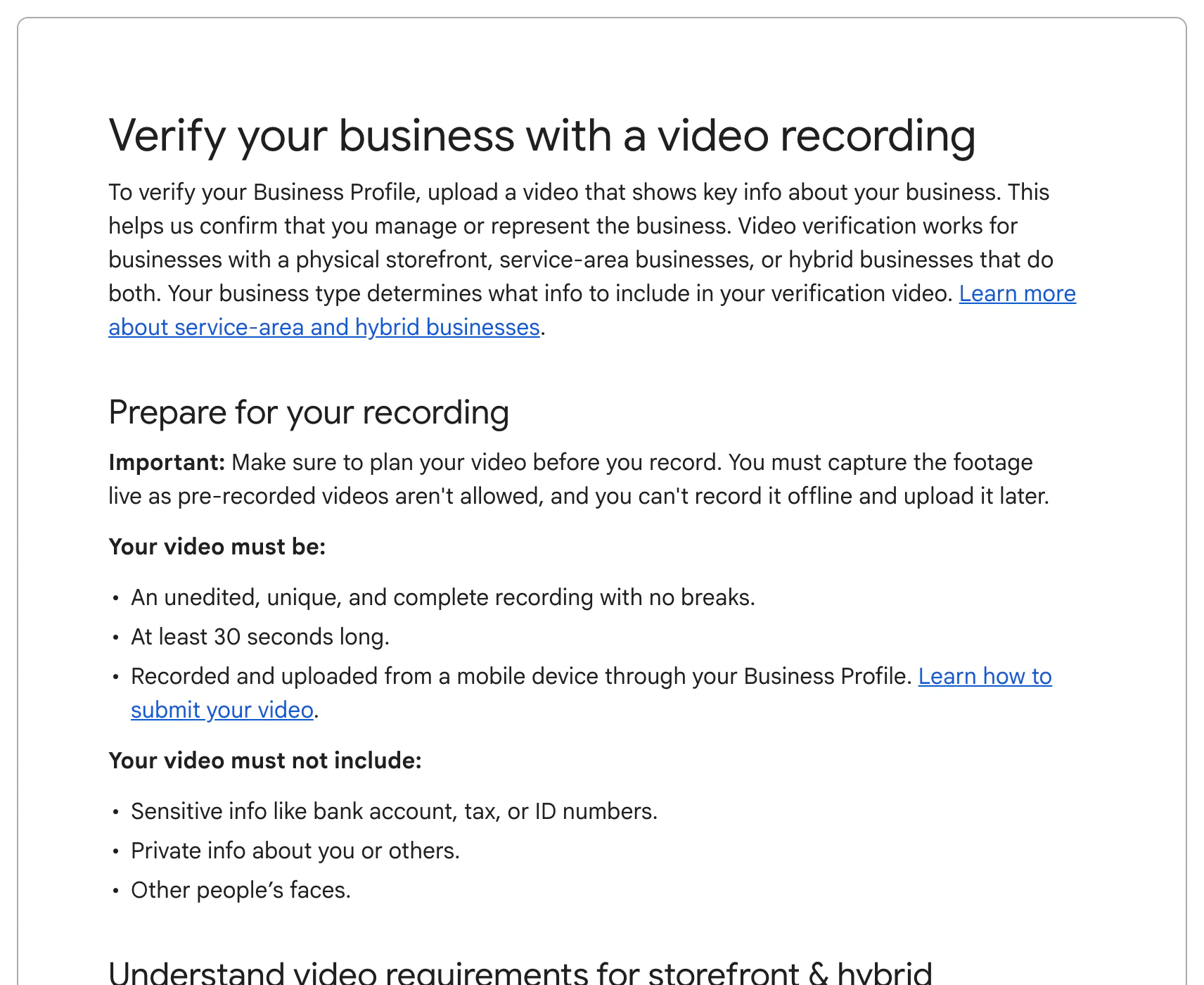
Plan the video before you press record, because it has to be one continuous take. A good order:
- 1Start outside: show the street sign or nearby businesses so Google can place you, then the building.
- 2Show your business name on permanent signage: the sign over the door, window lettering, or a branded vehicle for service-area businesses.
- 3Go inside or to the equipment: the shop floor, tools, inventory or work vehicle that show it's a working business.
- 4Prove you manage it: unlock the door, open the register or point-of-sale system, or show the tools and equipment only staff would have.
Video verification can't be completed on a desktop. If you start there, Google shows a QR code so you can finish on your phone.
Set up the profile so it passes
Many verification problems start before the video. Check these first:
- The business name matches your signage and registration exactly, with no added keywords or locations
- The address is a real place where you meet customers, or it's hidden and service areas are set if you travel to customers
- The phone number is a local number answered by the business
- The category describes what the business is; see how to choose categories
- The website shows the same name, address and phone
Profiles that break these guidelines can fail verification or be suspended later, even after they pass. Fixing them first saves a second attempt.
How long verification takes
Phone, text and email codes usually verify instantly. Google says a video can take up to 5 business days to review, and postcards take as long as the mail does. While you wait, avoid editing your name, address or category, because changes can restart the review.
If verification fails
- Read the reason Google gives, then record a new video that fixes it and still includes everything from the first one.
- Make sure your profile name matches your signage and registration exactly. Keywords added to the name are a common cause of failed verification and later suspension.
- If you work from home with no signage, show vehicles with your business name, equipment and documents that tie the business to you, without showing private information.
- If you're stuck in review for more than a week, contact Google Business Profile support.
Once verified, finish the profile: categories, services, hours, photos and a description. My guides on getting on Google Maps and choosing categories cover what to do next. If your profile is later suspended, see how to fix a suspended profile.
Frequently asked questions
How do I verify my Google Business Profile?
Open your profile while signed in, choose Verify, and follow the method Google offers. Most new profiles get video verification, which you record and upload from a phone.
Can I verify without a postcard?
Usually yes. Google now offers video, phone, text or email for many businesses, and postcards are less common. You can only use the methods Google offers your profile.
How long is the video for Google verification?
At least 30 seconds, recorded live in one continuous take. Keep it focused; a minute or two is enough to show the location, signage and proof that you manage the business.
Can a home-based business pass video verification?
Yes, if it serves customers. Show your work vehicle, equipment, tools and anything with the business name, without filming private information or other people.
Why does my profile say pending verification?
Google is reviewing your submission. Video reviews can take up to 5 business days; avoid making edits during that time.
Sources
- Verify your business with a video recording, Google Business Profile Help
- Verify your business on Google, Google Business Profile Help
- Guidelines for representing your business on Google, Google Business Profile Help
Written by Nouman Sabir
Nouman Sabir is an AI search and local SEO specialist with 5+ years of hands-on work across 100+ websites, from contractors and law firms to SaaS and Shopify stores. He is Top Rated on Upwork with a 100% Job Success Score and 44 client reviews. Everything here comes from client work he has done or data he pulled himself.