
Website migration SEO checklist: move without losing rankings
Redesigns, new platforms and domain changes are where most small businesses lose rankings, usually because old URLs stop working. Google publishes clear guidance on site moves. This checklist turns it into steps you can hand to your developer, with the redirect work done right.

By Nouman Sabir, AI search & SEO specialist
Updated · 3 min read

The short answer
- Map every old URL to its new one before launch, and redirect each with a permanent (301) redirect. Don't send everything to the homepage.
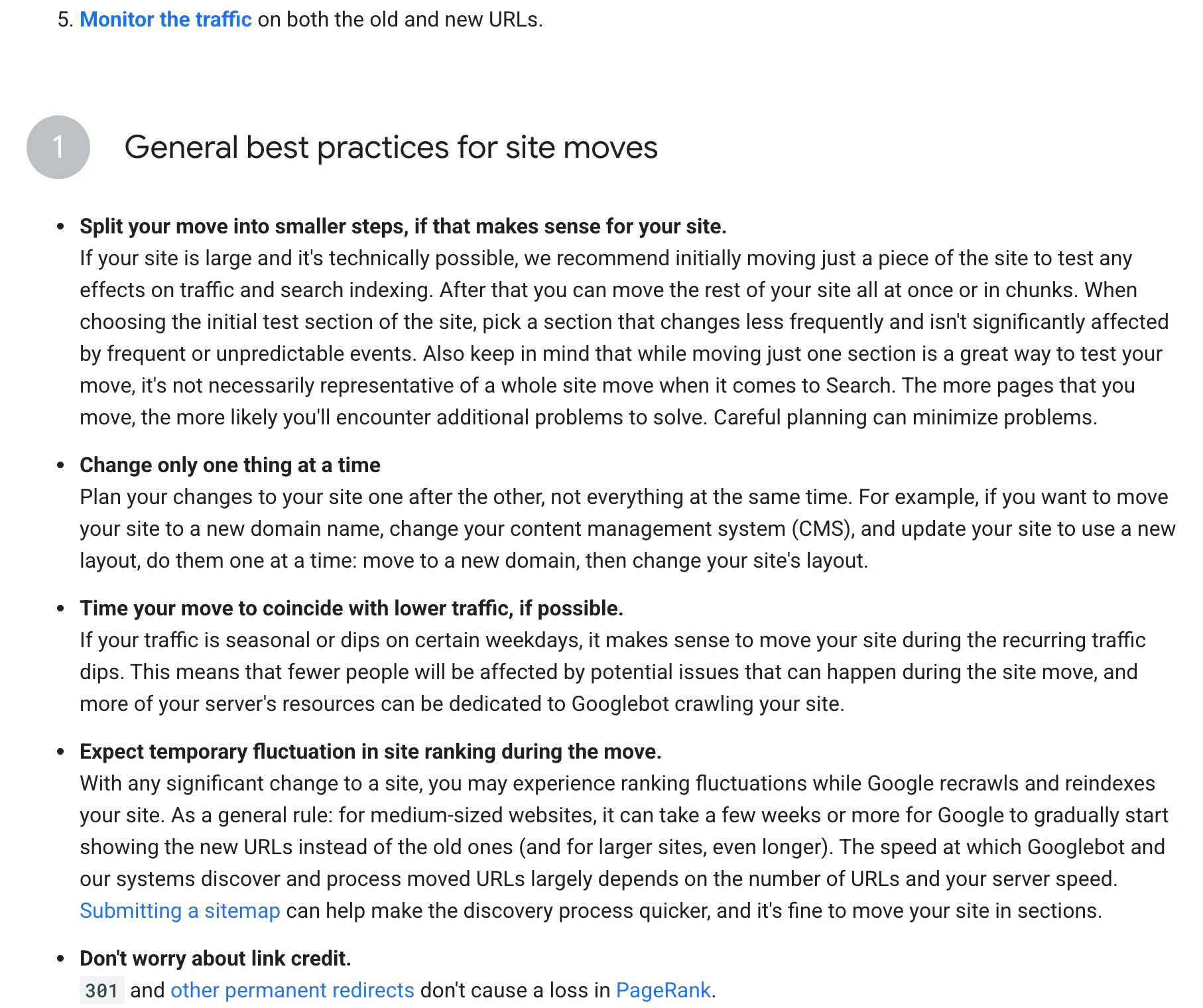
- Change one thing at a time where you can: domain, platform and design changes together make problems hard to trace.
- For a domain change, use Search Console's Change of Address tool and keep the redirects for at least a year, as Google recommends.
- Expect some ranking movement. Google says medium-sized sites can take a few weeks or more to settle.
Before the move
- 1Export every URL from the old site: sitemap, Search Console pages report, analytics landing pages and a crawl.
- 2Note the top pages: the ones with the most clicks, links and leads. These must keep working.
- 3Map old to new: a spreadsheet with each old URL and its closest new equivalent.
- 4Keep content that ranks: if a page brings traffic, move its content too, not just its URL.
- 5Verify both sites in Search Console.
- 6Check the new site's robots.txt and noindex settings, which are often left on from staging.
- 7Benchmark: clicks, rankings for key searches and leads, so you can compare after.
Redirects done right
- Use server-side permanent redirects (301) where possible
- Redirect each old URL straight to its final new URL, with no chains
- Don't redirect many unrelated pages to the homepage
- Keep query strings or tracking parameters only if the new site needs them
- Update internal links to the new URLs instead of relying on redirects
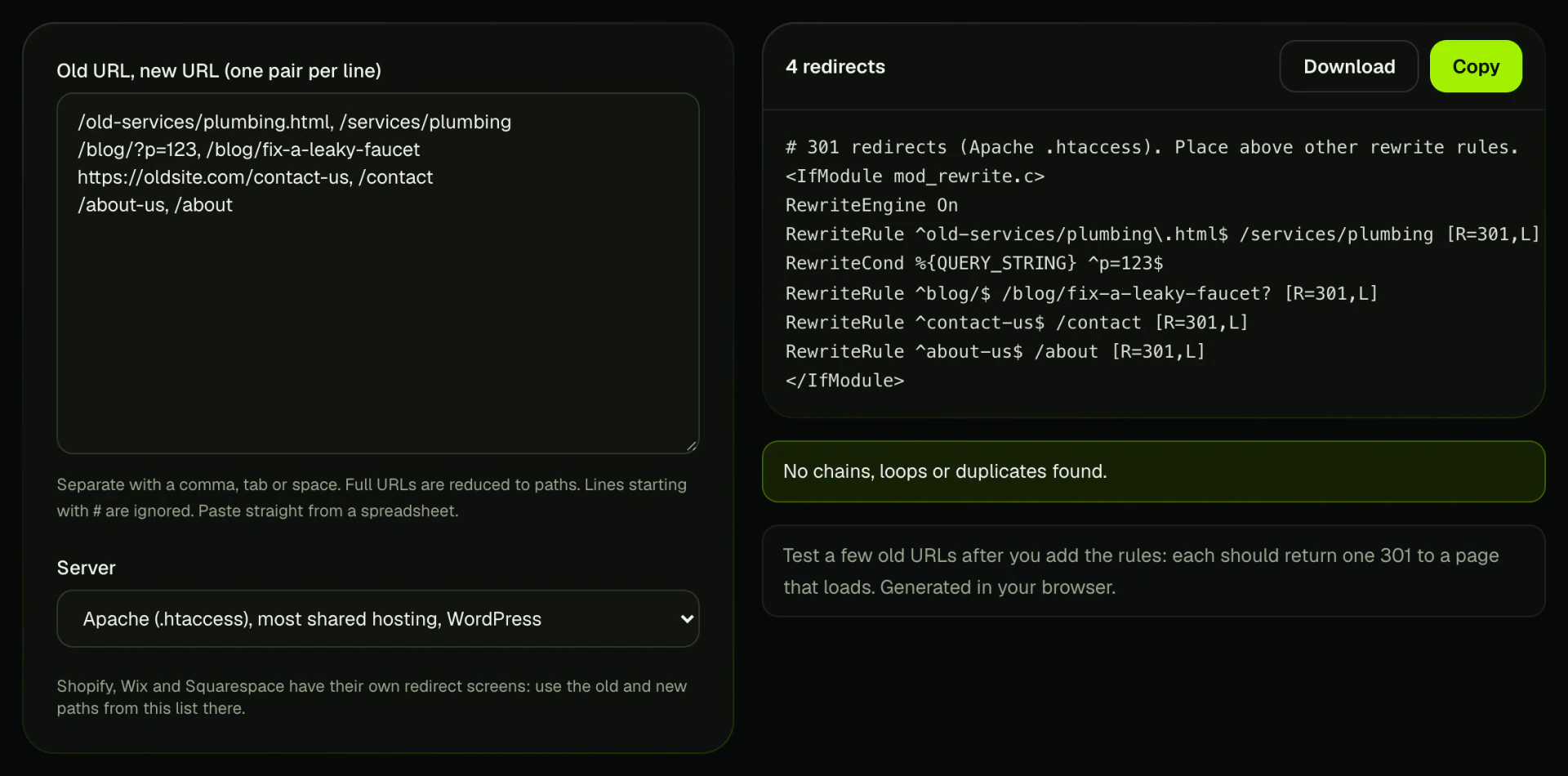
Paste your mapping spreadsheet into the redirect generator to get the rules.
Launch day
- 1Turn on the redirects and test a sample of old URLs: each should return one 301 to a page that loads.
- 2Check canonical tags, hreflang and structured data point to the new URLs.
- 3Submit the new XML sitemap in Search Console; the sitemap generator can build one.
- 4For a new domain, submit a Change of Address in Search Console from the old property.
- 5Update your Google Business Profile, Bing Places and directory listings with the new website URL.
- 6Update links you control: social profiles, email signatures, ads.
After the move
- Watch Search Console's page indexing and sitemap reports for errors and 404s
- Compare clicks and leads with your benchmark weekly for the first two months
- Fix any 404s that show traffic or links with new redirects
- Ask important external sites to update their links
- Keep redirects in place for at least a year; Google says this lets it transfer signals to the new URLs
Frequently asked questions
Will migrating my website hurt SEO?
It can if old URLs break. With a full URL map, 301 redirects and the steps above, most sites see only temporary fluctuation.
How long should I keep 301 redirects after a migration?
Google recommends keeping them generally at least one year, and longer is fine.
Do 301 redirects lose PageRank?
Google says 301 and other permanent redirects don't cause a loss in PageRank.
How long does it take for Google to recognize a site move?
Google says a few weeks or more for medium-sized sites, and longer for large ones.
Should I change my domain and design at the same time?
Google suggests changing one thing at a time where possible, so it's easier to find the cause if traffic drops.
Sources
- Site moves with URL changes, Google Search Central
- Change of Address tool, Search Console Help
- Redirects and Google Search, Google Search Central
Written by Nouman Sabir
Nouman Sabir is an AI search and local SEO specialist with 5+ years of hands-on work across 100+ websites, from contractors and law firms to SaaS and Shopify stores. He is Top Rated on Upwork with a 100% Job Success Score and 44 client reviews. Everything here comes from client work he has done or data he pulled himself.


